Moving to Ultra Course Sites for 2022/23
Blackboard Learn Ultra is the new version of Blackboard. We moved to Ultra Base Navigation in June 2021 whilst continuing to use the ‘Original course view’ for our modules and course sites on Weblearn.
The next step is moving to the Ultra course view to take advantage of new features and a streamlined, responsive interface design that works well on any device.
The first step of moving to the Ultra Course View will be combined with a refresh of our existing course sites and all existing course sites will be replaced with Ultra course sites for 2022/23.
This will give staff and students the opportunity to experience the new Ultra course view and provide feedback which will inform any further roll-out of the Ultra course view.
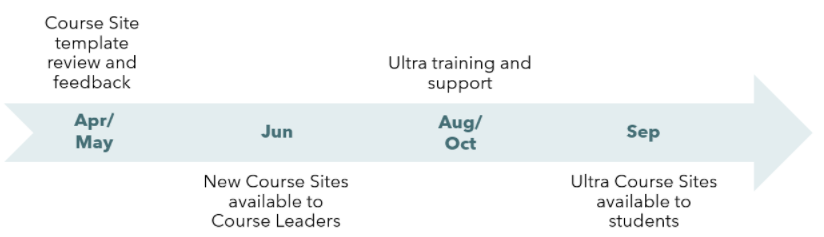
Timeline
Ultra Course View
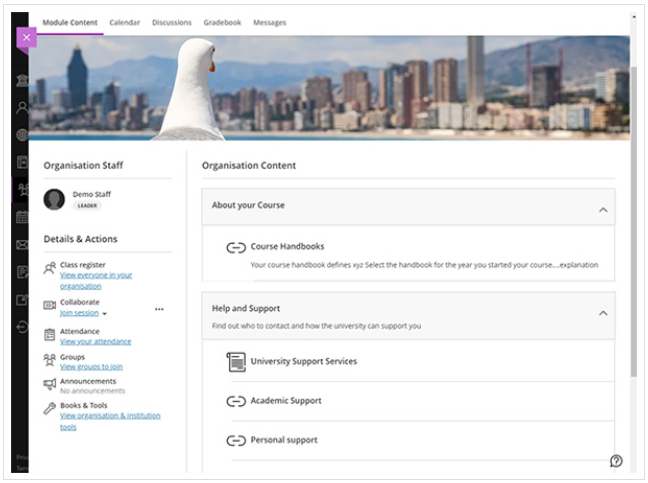
The Blackboard Ultra Course View provides a new look and feel for Weblearn Organisations.
Mobile-friendly. The Ultra Course View adapts to the size of users’ screens whether they view courses on a mobile phone, tablet, or desktop computer. Users can access their courses on the go and on their schedules.
Simplified workflows. Ready to add course content? On the Course Content page, select the plus sign to add content. The system walks you through the process to add assignments, discussions, links, and external content. Other common tasks, such as grading and sending messages, are simplified in the Ultra Course View as well.
Improved navigation. No need to dig for course tools. At the top of your screen, you’ll find content, events, discussions, grades, and messages, no matter where you are in the course.