
What’s New 2022/23
Ultra Course Sites
All existing course sites have been refreshed and replaced with new sites which use the Ultra Course View. The Ultra Course View provides a new look and feel for Weblearn Organisations.
Note: modules will not change for 2022/23.
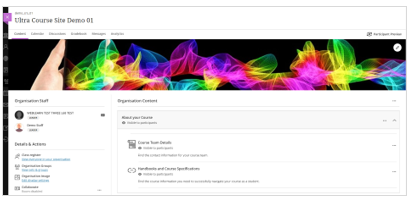
The new course sites are visible to students on Weblearn from 1 Sept 2022.
View the ‘How to’ guides: Blackboard Ultra
Sign up for a training session: Ultra Course Sites
Watch a session recording: Ultra Course Sites
Lecture Recording
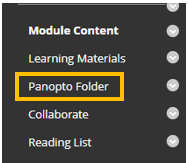
Panopto is the new lecture recording tool available through Weblelarn. All 2022/23 Weblearn modules will contain a Panopto Folder which will appear at the bottom of the module menu. Simply drag the folder up to the ‘Module Content’ section of the menu.
All lectures should be recorded and live steamed.
Understand the lecture recording requirements: FAQ: recording and streaming onsite lectures
View the ‘How to’ guides: Panopto
Sign up for a training session: Panopto and webcasting
Diversity, Equity, and Inclusion
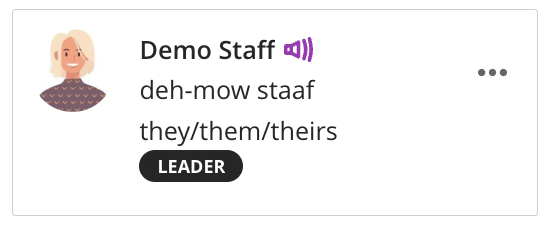
Over the summer Blackboard has made a number of diversity, equity and inclusion improvements to user profiles. Students and staff can now set their pronouns and name pronunciation on their profile.
Pronouns: users can select their pronoun from a list of common pronouns, or put in a request for a another pronoun to be added.
Pronunciation: the pronunciation can be added as the phonetical spelling of a name and a voice recording of how to pronounce the name.
View the ‘How to’ guide: Personalise your account
Pronouns and pronunciation will appear alongside a name in the following locations on Weblearn:
- Discussion Boards
- Messages
- Weblearn Assignments inline grading
- Class register (Ultra Course Sites only)
- User Management > Users and Groups
- Groups
Collaborate: Pause and Resume Breakout Groups
The new Collaborate breakout groups feature, Pause and Resume, allows you to pause a breakout group and bring participants back into the main room, and then reassign the participants into the same breakout group.
Pause and Resume buttons will allow you:
- Pause: put breakout groups on standby and regroup all attendees in the main room.
- Resume: restart breakout groups and split all attendees into the same groups.
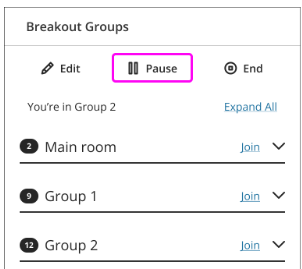
Note: only the moderator who paused groups can resume them.
Blackboard help page: Breakout groups
Blackboard Mobile App
Blackboard have consolidated their two mobile apps into to a single app for both instructors and students. Instructors can use the app to post announcements and interact with students while on the go.
Apple Store: Download for your Apple device
Google Play: Download for your Android device
Note: Support for the Blackboard Instructor app ends in September 2022.
Blackboard help page: Teaching a course with the Blackboard app