Base Navigation offers a more modern, intuitive navigation that provides quick access to the most critical information from across all Modules. It creates a more engaging, efficient, and enjoyable experience for students.
Activity Stream
The Activity Stream will keep you up-to-date with changes and updates in your modules. This could include new content being released, new announcements or discussion board posts, or new activities for you to complete.
The activity stream lists all your system notifications.
As default you will receive notifications for all activities on Weblearn. If you find you are receiving too many notifications you can choose which notifications you would like to receive or switch off.
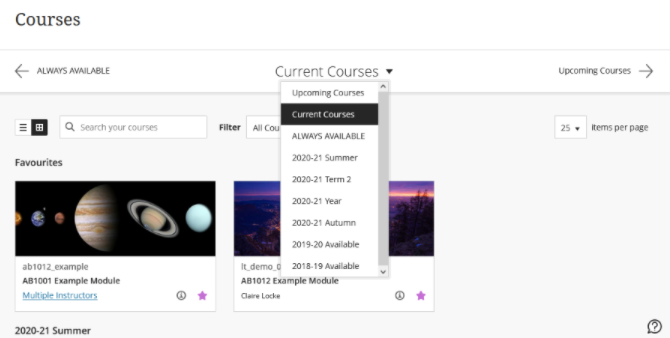
Modules are grouped by term and listed in alphabetical order within that term as default. The modules page provides new features so users can locate modules more easily. The new features include:
Search box: enter the module code or name to locate a specific module
View modules in a Term: use the dropdown menu to select the term you would like to view the modules for
Favourites: select the star icon on the module page to move the module to the top of the modules list.
Ultra Base Navigation provides a new way to navigate Weblearn and access global tools. There will be no change to modules or content.
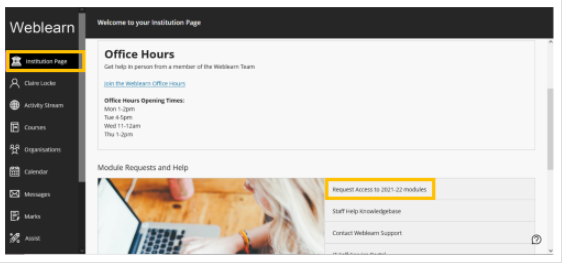
Module Request Form
The module and course site request form has moved and is now available via the Institution page:
Notifications
As default you will receive notifications for all activities on Weblearn. If you find you are receiving too many notifications you can choose which notifications you would like to receive or switch off.
Modules are grouped by term and listed in alphabetical order within that term as default. The modules page provides new features so users can locate modules more easily. The new features include:
Search box: enter the module code or name to locate a specific module
View modules in a Term: use the dropdown menu to select the term you would like to view the modules for
Favourites: select the star icon on the module page to move the module to the top of the modules list.
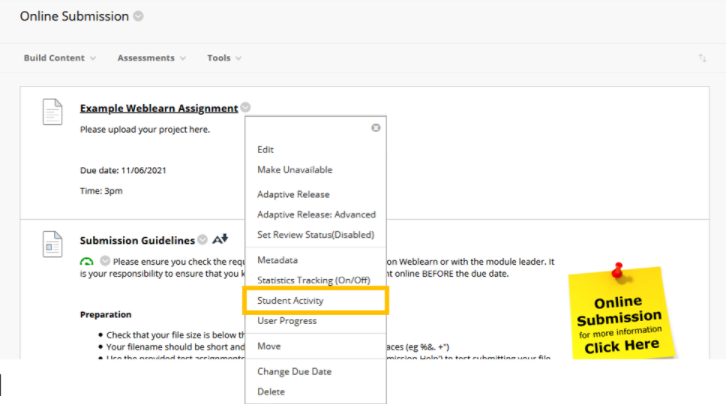
The Student Activity Report is available for Weblearn Assignments, Tests and Discussion Boards (Turnitin is not included). It provides an insight into the assessment including overview information and details about individual student performance.
Access the report from the options menu on the assessment:
The report allows you to view when a student opened an assessment, started submitting and the time the submission was completed.
Customise your module or course site by adding a banner. The banners are visible in two locations in Weblearn, on the Modules page in the tile view, and on the module entry page.
On Wed 30 June at 4:30pm Weblearn will be updated to incorporate the Ultra Base Navigation (UBN).
UBN delivers the information you need, the way you want it. The most critical information from all your modules and organisations is right at your fingertips. With a modern design, timesaving tools, and the ability to take action with one click – the Ultra Base Navigation will help you save time and stay on top of what’s important.
The current Weblearn Home page will be replaced by a menu on the left that allows you to access essential functions in one click.
You’ll find all of your modules and organisations under links on the new menu
When you access a module, it will open as a layer over the new Ultra Base Navigation menu. Everything in the module will be exactly the same as on our current Weblearn version.
We’re updating Weblearn to incorporate the new Blackboard Ultra Base Navigation this summer (exact date tbc). This new navigation has a sleek, modern look and feel and will save you time with simpler workflows and easier access to important information.
What is the Ultra Base Navigation?
It is a modern, intuitive navigation menu that lives outside of modules. It includes links to new pages such as the Activity Stream, Calendar, Messages, etc. that provide quick access to the most critical information consolidated from all your modules.
Your modules will not change. They will look and operate exactly as they do now
Once Base Navigation has been enabled you will see the new navigation as soon as you log into Weblearn
The Weblearn start page will be replaced by the ‘Activity Stream’ showing all recent activity on your modules and course sites
Your modules will be available on a ‘Modules’ link in the new navigation menu
How will this enhance your efficiency and experience?
Works well on mobile devices. This navigation is designed to work well regardless of which device you’re using.
Aggregates important information. Allyour module and organisation information – like calendar, messages and grades – is now consolidated into one global view, minimizing the time spent navigating into each individual module.
Only one click away. See something that needs your attention? Just click on it and you will be taken directly there, minimizing clicks and saving time.
Communication. A new messages tool will become available, allowing students check all of their Weblearn messages from a central page. This is a great new tool for users who are less likely to check their university email
Piloting Ultra Module View. Interested staff will be able to pilot Blackboard’s new module interface, the Ultra Module View.
Will I be affected by downtime?
The upgrade will take hours rather than days. It will be scheduled for an evening or weekend slot after the main teaching and marking period for this year is over.
Once you access the upgraded version, the first page you see will be the activity stream and all modules will appear on the ‘Modules’ tab. Your modules will be exactly the same as before, so there is no need to get your head around new functionality or tools immediately.
What will the change look like?
The current Weblearn landing page will be replaced by a menu on the left that allows you to access essential functions in one click.
You’ll find all of your modules and organisations under links on the new menu
When you access a module, it will open as a layer over the new Ultra Base Navigation menu. Everything in the module will be exactly the same as on our current Weblearn version.
Weblearn will be unavailable from 1am on Sat 27 June until Mon 29 June as we move to the most up-to-date version of Blackboard Learn.
Weblearn downtime – 27th to 29th June
The work will start at 1am on Sat 27th and should be completed by Mon 29th June. Weblearn will be unavailable to users during the upgrade. We will aim to make the system available again as soon as possible on Monday.
What is included in the yearly upgrade?
As part of the upgrade, Weblearn is moving to a cloud hosting platform called Blackboard SaaS (Software as a Service).
No more downtime for upgrades!
Applications need to be upgraded regularly to get access to improved or new functionality and to make sure they remain secure. Since updating a large application like Weblearn takes a fair amount of time, we currently need 2-3 days downtime to apply an upgrade.
Once we’re on SaaS hosting, upgrades can be applied throughout the year in small increments without the need for 2-3 days downtime over summer.
What else is changing?
The upgrade consists mainly of bug fixes and security updates, and Weblearn will look the same as before.
Grading Weblearn assignments – moving from Box View to Annotate
On June 22nd Blackboard will change the current Inline Grading tool for Weblearn Assignments (not Turnitin) from Box View to a new tool called Annotate. Annotate will provide improved functionality and all pre-existing annotations created through Box View will be migrated and visible in Bb Annotate.