Categories
Uncategorised

What’s New 2022/23

What’s New 2022/23

Ultra Course Sites

All existing course sites have been refreshed and replaced with new sites which use the Ultra Course View. The Ultra Course View provides a new look and feel for Weblearn Organisations.

Note: modules will not change for 2022/23.
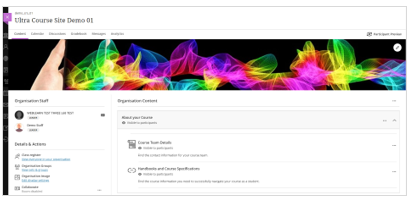
The new course sites are visible to students on Weblearn from 1 Sept 2022.

View the ‘How to’ guides: Blackboard Ultra

Sign up for a training session: Ultra Course Sites

Watch a session recording: Ultra Course Sites

Lecture Recording

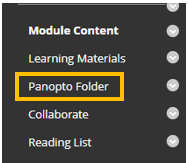
Panopto is the new lecture recording tool available through Weblelarn. All 2022/23 Weblearn modules will contain a Panopto Folder which will appear at the bottom of the module menu. Simply drag the folder up to the ‘Module Content’ section of the menu.
All lectures should be recorded and live steamed.

Understand the lecture recording requirements: FAQ: recording and streaming onsite lectures

View the ‘How to’ guides: Panopto

Sign up for a training session: Panopto and webcasting

Diversity, Equity, and Inclusion

Over the summer Blackboard has made a number of diversity, equity and inclusion improvements to user profiles. Students and staff can now set their pronouns and name pronunciation on their profile.

Pronouns: users can select their pronoun from a list of common pronouns, or put in a request for a another pronoun to be added.

Pronunciation: the pronunciation can be added as the phonetical spelling of a name and a voice recording of how to pronounce the name.
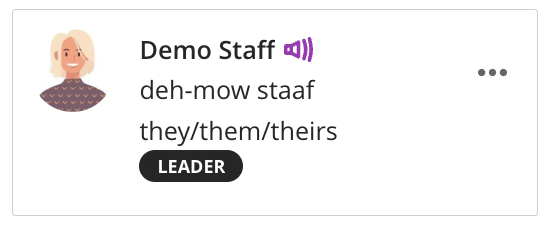
Example profile with the user name, phonetical spelling and pronouns.

View the ‘How to’ guide: Personalise your account

Pronouns and pronunciation will appear alongside a name in the following locations on Weblearn:

  • Discussion Boards
  • Messages
  • Weblearn Assignments inline grading
  • Class register (Ultra Course Sites only)
  • User Management > Users and Groups
  • Groups

Collaborate: Pause and Resume Breakout Groups

The new Collaborate breakout groups feature, Pause and Resume, allows you to pause a breakout group and bring participants back into the main room, and then reassign the participants into the same breakout group.

Pause and Resume buttons will allow you:

  • Pause: put breakout groups on standby and regroup all attendees in the main room.
  • Resume: restart breakout groups and split all attendees into the same groups.
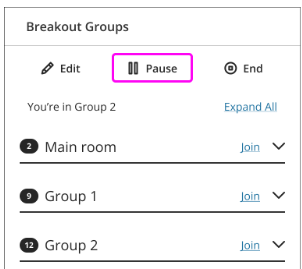
Note: only the moderator who paused groups can resume them.

Blackboard help page: Breakout groups

Blackboard Mobile App

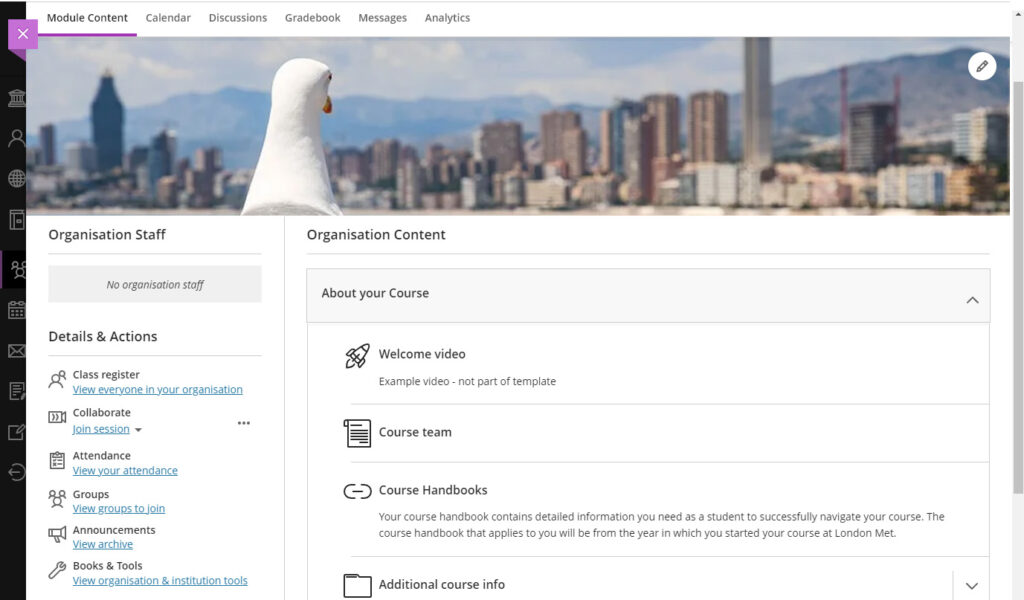
Blackboard have consolidated their two mobile apps into to a single app for both instructors and students. Instructors can use the app to post announcements and interact with students while on the go.

Note: Support for the Blackboard Instructor app ends in September 2022.

Blackboard help page: Teaching a course with the Blackboard app
Categories
Uncategorised

Student Course Sites Feedback Session

Student Course Sites Feedback Session

Each course has its own area under the Organisations section of Weblearn which is used to provide course specific information and announcements to students.

In 2022/23, the Course Sites will be updated with a new look and mobile first design, and we need student feedback to help decide what should be included.

Join the Course Sites workshop – Friday 29 April at 12pm

If you would like to see a preview of the new version and give your feedback in person, please join the Course Sites Workshop via Collaborate on Friday 29 April at 12pm.

The session will open at 11:45am: Join the Course Sites Workshop

Categories
Uncategorised

Moving to Ultra Course Sites for 2022/23

Moving to Ultra Course Sites for 2022/23

Blackboard Learn Ultra is the new version of Blackboard. We moved to Ultra Base Navigation in June 2021 whilst continuing to use the ‘Original course view’ for our modules and course sites on Weblearn.

The next step is moving to the Ultra course view to take advantage of new features and a streamlined, responsive interface design that works well on any device.

The first step of moving to the Ultra Course View will be combined with a refresh of our existing course sites and all existing course sites will be replaced with Ultra course sites for 2022/23.

This will give staff and students the opportunity to experience the new Ultra course view and provide feedback which will inform any further roll-out of the Ultra course view.

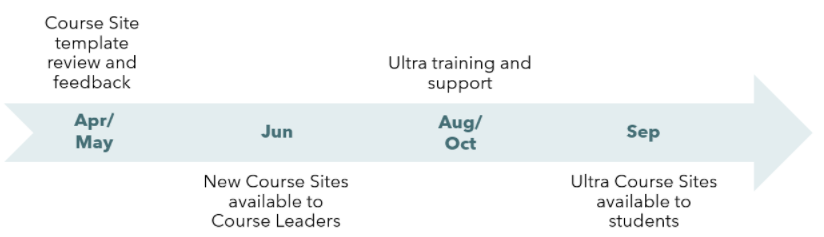
Timeline

Ultra Course View

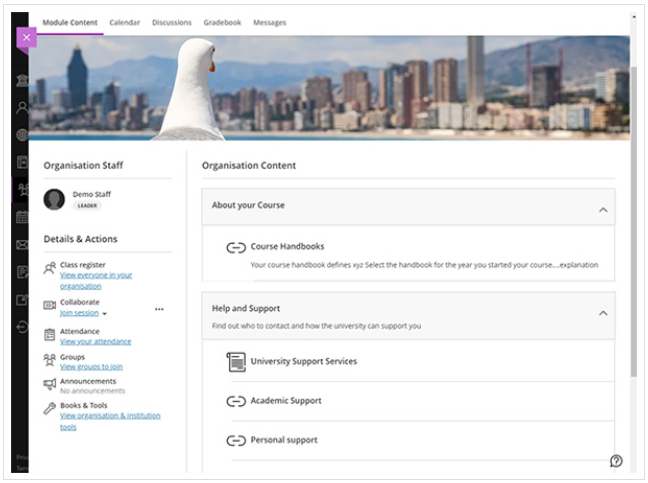
The Blackboard Ultra Course View provides a new look and feel for Weblearn Organisations.

Mobile-friendly. The Ultra Course View adapts to the size of users’ screens whether they view courses on a mobile phone, tablet, or desktop computer. Users can access their courses on the go and on their schedules.

Simplified workflows. Ready to add course content? On the Course Content page, select the plus sign to add content. The system walks you through the process to add assignments, discussions, links, and external content. Other common tasks, such as grading and sending messages, are simplified in the Ultra Course View as well.

Improved navigation. No need to dig for course tools. At the top of your screen, you’ll find content, events, discussions, grades, and messages, no matter where you are in the course.

Categories
Uncategorised

Lecture Recording with Panopto

Lecture Recording with Panopto

Panopto is the new lecture recording tool which will replace MEDIALecture from 2022/23.

Panopto is a recording tool which can be used for lecture recording and recording asynchronous content. Some of the benefits of Panopto include:

  • Record in browser option (no installation required)
  • Multiple recording streams (screen and video)
  • Auto-captions
  • Student video submissions
  • Video Quizzes
  • Webcasting

All 2021/22 Weblearn modules are ‘Panopto ready’ and early adopters can set up a link to their Panopto course folder and start using it for lecture recording straight away.

‘HOW TO’ GUIDES

Categories
Uncategorised

Turnitin LTI integration – changes for 2021/22

Turnitin LTI integration – changes for 2021/22

Turnitin is moving to a new way of providing access to Turnitin through Weblearn called Turnitin LTI integration. The LTI integration is more robust than our current integration and has a simplified interface and improved dialogue for students when uploading.

The new integration is already available on Weblearn and you can start using it right away for your 2021/22 online submissions or wait until the Spring semester to make the switch.

This change does not affect the Turnitin feedback studio, so marking processes and viewing similarity reports remain the same.

Support and training

For an overview of the changes, sign up for a “Turnitin LTI: creating and managing assignments” session available at vletraining.eventbrite.co.uk

Support materials will appear soon on the Learning Technology Support pages

Why is this change happening now?

Our current integration (called Turnitin Basic Building Block) will stop working in January 2023 and users will no longer be able to access Turnitin assignments submitted through the Basic Integration after that date. To make sure that all submissions made in 2021/22 can be accessed for at least 12 month after the original deadline, we need to disable submissions to Turnitin Basic from February 2022.

You can continue using the Basic Integration until January 2022, at which point we will switch the Basic Integration into a ‘read-only’ mode.

Submissions made through the LTI integration will remain available for staff for 24 months after a module has completed

Key dates

  • Sept 2021: new Turnitin LTI integration is available through Weblearn
  • Feb 2022: current Turnitin Basic is switched off and will allow ‘read only’ access to previous submissions
  • Jan 2023: Turnitin Basics will be removed from Weblearn and users can no longer access submissions made through the Basic integration.

Training for the new version will be scheduled from teaching week 2.

What’s new?

The way you access the option to create assignments and access the Turnitin Inbox (student submissions) has changed and will look slightly different, but you will already be familiar with most of the assignment settings.

Creating Assignments

The create assignment option is now under the ‘Build Content’ drop down menu:

The build content dropdown menu expanded with the Turnitin option highlighted

Managing assignments

The changes include

  • Access Assignment inbox directly from Assignment link
  • Weblearn preview user can be used to test submission as a student
  • Marking groups are more tightly integrated and can be easily accessed from the assignment inbox
  • Some configuration settings can’t be changed once the assignment has been set up

Accessing LTI assignments

In the Turnitin Basic integration, instructors need to access the assignments from Module Management > Module Tools > Turnitin Assignments.

That link doesn’t exist for the LTI integration, and instructors can access the assignment inbox by simply clicking on the assignment on ‘Online Submission’

An example turnitin assignment

The Turnitin Assignment inbox has simplified workflows and a new look and feel.

an example turnitin inbox with an example student displaying
Categories
Uncategorised

New Ultra Base Navigation (Students)

New Ultra Base Navigation (Students)

Base Navigation offers a more modern, intuitive navigation that provides quick access to the most critical information from across all Modules. It creates a more engaging, efficient, and enjoyable experience for students.

Activity Stream

The Activity Stream will keep you up-to-date with changes and updates in your modules. This could include new content being released, new announcements or discussion board posts, or new activities for you to complete.

The activity stream lists all your system notifications.

Notifications

As default you will receive notifications for all activities on Weblearn. If you find you are receiving too many notifications you can choose which notifications you would like to receive or switch off.

Managing Module Page

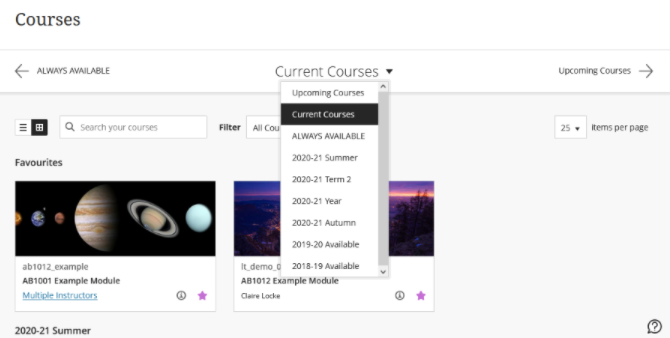
Modules are grouped by term and listed in alphabetical order within that term as default. The modules page provides new features so users can locate modules more easily. The new features include:

  • Search box: enter the module code or name to locate a specific module
  • View modules in a Term: use the dropdown menu to select the term you would like to view the modules for
  • Favourites: select the star icon on the module page to move the module to the top of the modules list.
Categories
Uncategorised

New Ultra Base Navigation (Staff)

New Ultra Base Navigation (Staff)

Ultra Base Navigation provides a new way to navigate Weblearn and access global tools. There will be no change to modules or content.

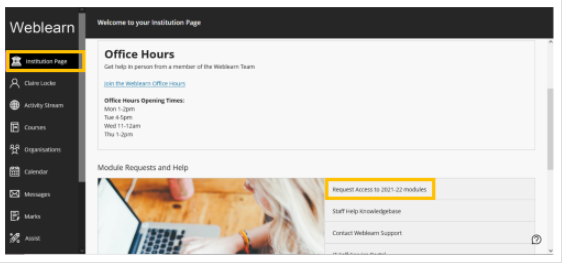
Module Request Form

The module and course site request form has moved and is now available via the Institution page:

Notifications

As default you will receive notifications for all activities on Weblearn. If you find you are receiving too many notifications you can choose which notifications you would like to receive or switch off.

Managing Module Page

Modules are grouped by term and listed in alphabetical order within that term as default. The modules page provides new features so users can locate modules more easily. The new features include:

  • Search box: enter the module code or name to locate a specific module
  • View modules in a Term: use the dropdown menu to select the term you would like to view the modules for
  • Favourites: select the star icon on the module page to move the module to the top of the modules list.

Assessments: Student Activity Report

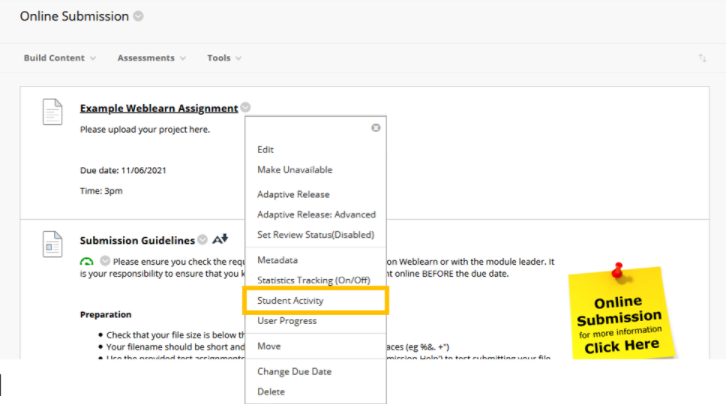
The Student Activity Report is available for Weblearn Assignments, Tests and Discussion Boards (Turnitin is not included). It provides an insight into the assessment including overview information and details about individual student performance.

Access the report from the options menu on the assessment:

The report allows you to view when a student opened an assessment, started submitting and the time the submission was completed.

Module/Organisation Banners

Customise your module or course site by adding a banner. The banners are visible in two locations in Weblearn, on the Modules page in the tile view, and on the module entry page.

Categories
Uncategorised

Summer Weblearn Update

Summer Weblearn Update

On Wed 30 June at 4:30pm Weblearn will be updated to incorporate the Ultra Base Navigation (UBN).

UBN delivers the information you need, the way you want it. The most critical information from all your modules and organisations is right at your fingertips. With a modern design, timesaving tools, and the ability to take action with one click – the Ultra Base Navigation will help you save time and stay on top of what’s important.

What will the change look like?

The current Weblearn Home page will be replaced by a menu on the left that allows you to access essential functions in one click.

screenshot of activity stream

You’ll find all of your modules and organisations under links on the new menu

When you access a module, it will open as a layer over the new Ultra Base Navigation menu. Everything in the module will be exactly the same as on our current Weblearn version.

screenshot of original module
Categories
Uncategorised

Weblearn Upgrade 27-29 June 2020

Weblearn Upgrade 27-29 June 2020

Weblearn will be unavailable from 1am on Sat 27 June until Mon 29 June as we move to the most up-to-date version of Blackboard Learn.

Weblearn downtime – 27th to 29th June

The work will start at 1am on Sat 27th and should be completed by Mon 29th June. Weblearn will be unavailable to users during the upgrade. We will aim to make the system available again as soon as possible on Monday.

What is included in the yearly upgrade?

As part of the upgrade, Weblearn is moving to a cloud hosting platform called Blackboard SaaS (Software as a Service).

No more downtime for upgrades!

Applications need to be upgraded regularly to get access to improved or new functionality and to make sure they remain secure. Since updating a large application like Weblearn takes a fair amount of time, we currently need 2-3 days downtime to apply an upgrade.

Once we’re on SaaS hosting, upgrades can be applied throughout the year in small increments without the need for 2-3 days downtime over summer.

What else is changing?

The upgrade consists mainly of bug fixes and security updates, and Weblearn will look the same as before.

Grading Weblearn assignments – moving from Box View to Annotate

On June 22nd Blackboard will change the current Inline Grading tool for Weblearn Assignments (not Turnitin) from Box View to a new tool called Annotate. Annotate will provide improved functionality and all pre-existing annotations created through Box View will be migrated and visible in Bb Annotate.

View the full Bb Annotate infromation