
Teams are a shared area for a group of people.
Teams can contain standard channels available to all members, and private channels that are shared with a subset of team members. Each Team contains a ‘General’ channel by default that is available to all team members.
Teams are created from templates that contain different default tabs and capabilities.
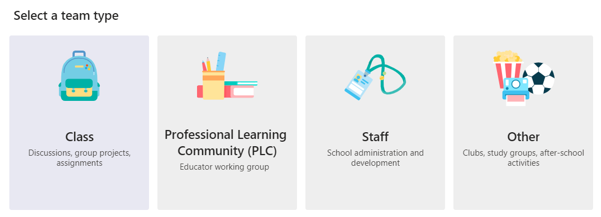
Choosing Team templates
- Use Class template for activities with Students, eg Teams meetings
- Use Other template for any staff or administrative Teams
- Avoid PLC and Staff templates. They are identical to the Other template, but add a PLC or Staff Notebook tab that you’d need to rename or delete.
The Class template provides additional functionality that is not available in other templates.
Note: The template has an ‘Upload Class Materials’ prompt and an Assignment tab by default, but these options must not be used for London Met MS Teams
You can add the Insight app as a tab to a class team. The Insight app provides information about student activity on the team, eg how often a student has accessed the app or when they attended meetings.
Using Channels
Channels can be used to create working groups or private areas within the Team.
You can create
- Standard channels: accessible to everyone on the team
- Private channels: accessible only to group owner(s) and members given the right to access the channel
You can use private channels for ongoing interactions or meetings restricted to an individual member or small groups of members.
For more information see the Microsoft help pages on Teams and Channels