
Turnitin: new look and feel
Turnitin is being updated with a more user-friendly, accessible design: Featuring a new intuitive interface, streamlined layout, and in-app guidance, the new Turnitin Feedback Studio offers an enhanced and inclusive user experience, with a goal of achieving the highest accessibility standard by the end of the year.
Find out more: Create Turnitin Assignment
All current assignments will not change and will be exactly the same in both the staff and student view
New Create Assignment Page

Old Create Assignment Page

Gradebook: new Grid View
View the full information and overview videos: New Gradebook
The Gradebook will be updated to improve the overall experience, making key features easier to find and use.
The four Gradebook tabs will be replaced with two views, the List View and the Grid View.

Content Editor (Beta)
View more information: New Content Editor (Beta)
Blackboard is introducing a new Content Editor. An early ‘Beta’ version of the content editor is now available, the full replacement of the current content editor is expected by Jan 2027.
The new content editor provides an improved menu, table edit options and additional list types. Further functionality will appear before the full release of the final version.

Duplicate content items
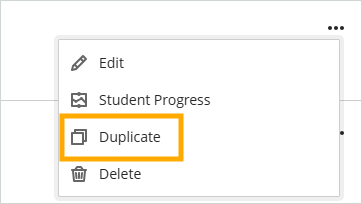
You can now duplicate items of content on the Module Content page. The duplicate retains all content and settings from the original content. It is hidden from students by default. Instructors can rename and edit the copy before making it visible to students.
Panopto Quizzing Tool
View the full information and instructions: Panopto Quizzing Tool in Weblearn
The Panopto Quizzing Tool integrates Panopto quizzes or video viewing progress with the Weblearn Gradebook, making it easy to use video for formative tasks and measure how students have engaged with the video content.
Quizzing tool links can be created in:
- Learning Modules
- Content Page (e.g. for Welcome Video)
Example: Students can take an interactive Panopto Quiz in a Learning Module and the results will be displayed in the Weblearn Gradebook after they completed the video quiz.