
Feedback and marks for online submissions will typically be made available to you via the online submissions link where you submitted your assessment.
Note: all marks published on Weblearn are provisional. Your confirmed results will be published via Evision on the module result publication dates after Subject Standards Boards have confirmed module results.
Your Activity Stream will display a notification when your marks and feedback have been released. Click on the name of the module, or the assignment name to open the module.

Alternatively, go to the ‘Modules’ page to access the module where you want to view your feedback and mark.
A new item alert will be displayed at the top of the module next to the ‘Gradebook’ tab where there is new content for you to view.
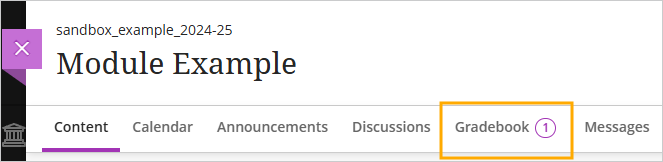
Click on the ‘Gradebook’ tab
The provisional mark you have received for the assessment will be displayed in the ‘Mark’ column.
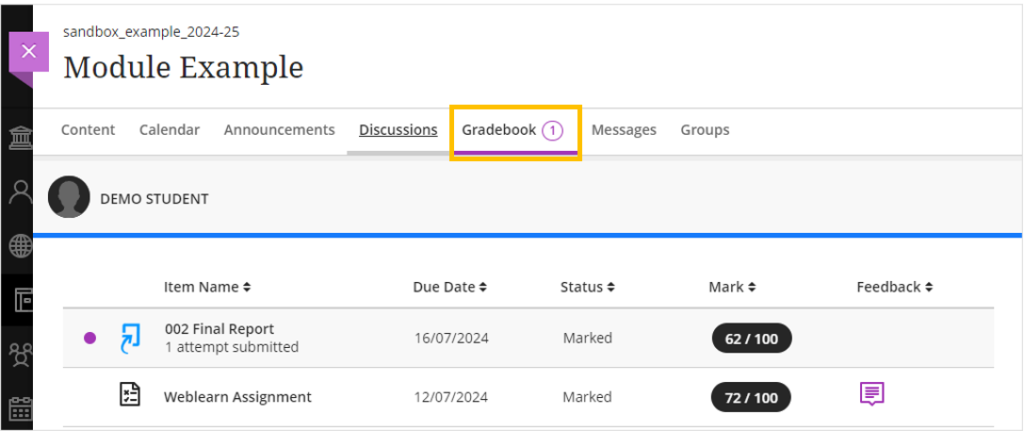
To view your feedback, click on the name of the assignment link – this will open the Turnitin Assignment Dashboard.
Click on your submission paper title

You submission paper will open in a new browser window
Click on the ‘Instructor Feedback’ icon to expand the feedback panel.

One the Instructor feedback panel you will be able to access:
- Text comments
- Voice comments
- Rubrics
Note: your lecturer may have used one of the comment options to leave your feedback, or a combination of the options available.

On your submission paper you may find bubble comments and annotations which have been added directly on your submission paper.
