
Videos are expected to be submitted through Panopto to a Weblearn assignment to ensure the video can no longer be edited by students after the due date.
The submission download process is similar to the Weblearn assignment download process.
Panopto videos are linked to the Weblearn assignment and won’t be included in a bulk submission download. Like other linked artefacts, they need to be downloaded individually for each student.
Content for Digital Packs
A video submission Digital Pack should include
- Weblearn Gradebook for marks and overall feedback
- Individual download of linked Panopto video fore each student
- Download of rubric feedback (if used)
If the assessment includes additional file submission (e.g. reports or presentations slides), the following will also need to be included
Download Panopto Videos
Videos need to be downloaded individually for each student who is included in the sample.
- Go to the Weblearn assignment submission in the marking view
- Click on the download icon showing on the Panopto video link
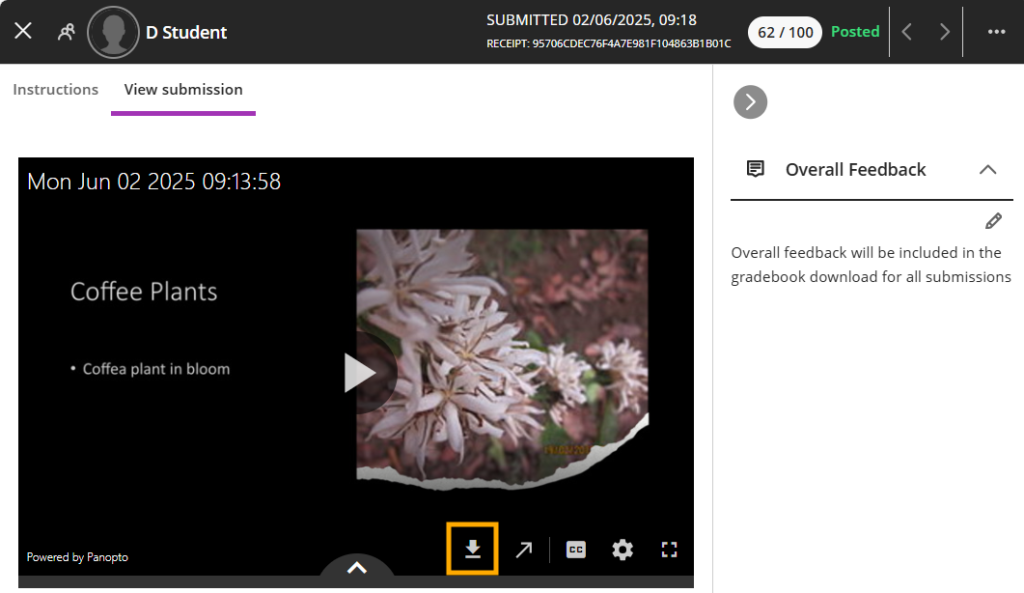
The video will be downloaded to your computer.
- Go to the location where the video has been save (commonly ‘downloads’ folder)
- Rename the .mp4 video file to include the Student ID or username
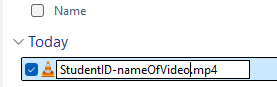
Once all videos for the sample have been downloaded and renamed, upload them to the SharePoint folder for the module.